The Exhaustion of AI Innovation: What Is a Dot, Anyway?
You can feel it, right? Every week there is another AI announcement, another model, another app, another feature you are supposedly behind on. I usually like being early to new technology, but even I find myself rolling my eyes when I am expected to try one more thing.
The latest breakthrough is not just a smarter chatbot. It is an AI agent with access to its own computer. That distinction matters. A chatbot can answer a question, write a draft, or help you think through a problem. An agent can keep working after you leave the conversation. It can use apps, browse the web, organize information, complete multi-step tasks, and come back when it needs a decision from you.
For the past few years, people have created this experience by pairing an AI model with an always-on computer, often a Mac mini or another dedicated machine. But the setups are elaborate. The model needs a place to work, and it needs permission to access the tools you use. Once you get it dialed in, it’s powerful, but it can also be exhausting to get right.
I have an iMac at home set up for this kind of work. I use Claude, and I have it set up for the most part. But something is constantly getting in the way. The computer goes to sleep. A permission is blocked. The lock screen interrupts the workflow. A connection fails. The agent hits an error, and now I am troubleshooting instead of getting help.
I am an advanced user, and I still get frustrated. That is why products like Meta's Muse, Grok Bot, and OpenAI's new Dots are compelling. The main promise is simple: you should not have to manage the computer behind the agent. You should be able to message your assistant, give it a task, and let it work.
These products run on dedicated cloud computers rather than relying only on your personal laptop or desktop. That means the agent can stay available even when your own device is asleep or offline. This is why you can do so much from an app on your phone. It doesn't use your phone’s cellular strength. It’s connected to another device somewhere else in the world. You’re just telling it what to do via text messages. It also means the companies behind them have to earn significant trust, because these agents may connect to your email, calendar, documents, browser, work tools, and other parts of your digital life. I’m not fully sure what I trust just yet, but I’m using them.
Muse, Grok Bot, and Dots
Muse is Meta's personal AI agent. It runs on what Meta calls a secure virtual machine, which is essentially a dedicated cloud computer with a browser. Meta says Muse can work in the background, connect to services, help manage tasks and projects, and ask for approval before higher-stakes actions such as sending an email or making a purchase. My early impression is that Muse has the cleanest consumer experience of the group. It feels simple. You give it something to do, and it gets to work. That simplicity matters because the average person should not need to understand permissions, virtual machines, background processes, or whether their computer is awake.
Grok Bot is xAI's always-on agent. Elon’s baby. It is designed as a team of agents, each with its own computer, that can keep working in apps and tools around the clock. It appears aimed more at power users and professional workflows than casual consumers. It may be capable, but it is also more expensive and can feel more complex because you are often thinking in terms of multiple bots and workflows rather than one straightforward assistant. It's very Slack-ish or Discord vibes, which isn’t bad, but maybe not for the everyday user.
Dots is OpenAI's new entry. OpenAI describes Dots as always-on agents powered by GPT-6 Astra. Each Dot has its own cloud computer and browser, can learn from feedback over time, and can work toward goals around the clock. Dots can use connected apps through OpenAI's plugin ecosystem. The first Dot is included with qualifying plans, but the entry-level access isn’t inexpensive. I believe it is starting at around $100 per month right now, depending on the plan and market. So this is not yet a mainstream feature for the average ChatGPT Plus subscriber. Muse is free, by the way, and Grok Bot is thirty dollars a month.
The important thing is that Dots is brand new. It is too early to say whether it will be better than Muse or Grok Bot. But OpenAI usually pays close attention to interface design, and that will matter. The company has a chance to make this powerful technology feel approachable, not overwhelming.
The actual problem is complexity
What AI companies still haven’t solved is making AI simple to use. Claude has projects, routines, skills, and computer-use capabilities. ChatGPT has projects, custom GPTs, connectors, deep research, and now Dots. Grok has its own ecosystem of agents, tools, and Elon Musk. Every company is moving quickly, and each one introduces a new way to organize your life.
For people who live in this technology world, that can be exciting. For everyone else, it can feel like homework. The average person does not want to compare model benchmarks, configure permissions, or learn a new AI operating system every month. They want something that works. They want to ask for help in plain language and trust that the assistant can do the next few steps without creating more work.
That is why Muse feels especially compelling to me. It is positioned as a personal agent first, not as a collection of AI features. Grok Bot may be more flexible for certain users, but it can also feel more technical. Dots may become very powerful, but OpenAI will need to make sure it doesn't get buried under whatever else they are working on.
Also, Muse will connect to Meta’s Glasses. Again, the average user needs an easy way to use the tool. I think glasses are a compelling interface. The reality is that good tech gets you the first wave of users, but you need to nail the user experience to get everyone else. Muse may be onto something.
My advice: choose a platform and grow with it
My encouragement is simple: do not worry too much about every new AI announcement. Pick the platform you enjoy using and let it get better over time. The major companies will keep borrowing each other's ideas. One company launches projects. Another launches workspaces. One launches agent skills. Another launches connectors. One makes an always-on cloud computer. Soon, everyone has one. The last 10 percent of capability is often not worth the hassle of moving all your information, reconnecting every app, rebuilding your workflows, and learning a whole new way to work. If you hold your breath, they will all look the same anyway.
My wife uses OpenAI because she knows it, it works for her, and it is already part of her habits. That is a great reason to stay with it. I will probably keep using Claude as my primary platform because I prefer the experience and use its coding features heavily. I will keep experimenting with Muse, Grok Bot, and Dots because I am apparently incapable of leaving new AI tools alone. But for my own setup, I may eventually just buy a Mac mini and build more around Claude because I like it that much. There is no shame in using what works for you.
What to try this week
If this whole space gives you a headache, you are not alone. I get tired too just thinking about how quickly it changes. Still, I would encourage you to try one of these always-on agents if you have access. Give it a real task, not just a novelty prompt. Ask it to research a trip, organize a project, summarize a messy set of documents, monitor something you care about, or log in and do something for you. That might sound crazy, but it is possible now.
I am excited about what this could mean at the enterprise-tool level for the church: helping teams organize projects, prepare information, coordinate follow-up, support communication, set up things in your people management tool, and reduce the administrative load that keeps people from doing the work only people can do. The agent could be the interface that connects all your platforms. At least, I see the potential in the near future. We do need to vet whether we can still trust these platforms. That is what I’m testing right now.
The technology is impressive. But the real question is whether it will make life simpler, or just give us one more thing to manage. The answer is still up to us and how we leverage the agents for our tasks. But today I am leaning toward simpler.
For example, I formatted this blog post while on my phone on a flight. Limited bandwidth wasn’t a problem. It logged into Squarespace and got it set up for me.
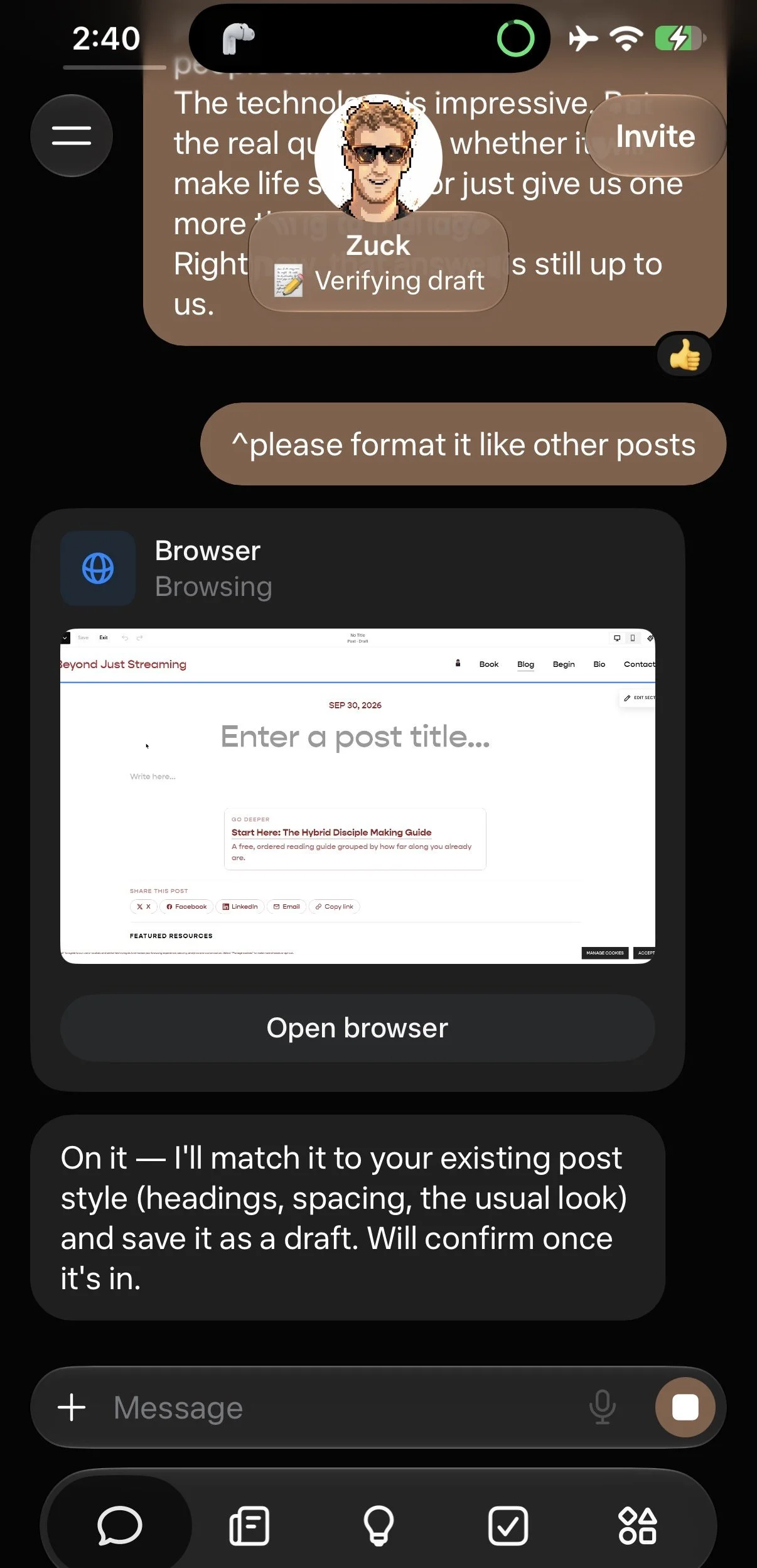
We live in a crazy futureish world. Now, go play around with Muse or your agent of choice.