What I've Built in Rock RMS Using Claude
We switched to Rock RMS in August of 2025. It was a big shift, and you can read about that whole saga here. My deep dive into Claude happened right around the same time, and honestly, the more I poked around, the more my mind got blown by what's possible inside the Rock ecosystem. We're running 18.2, and the agent support is wild, especially what Claude can do in MCP mode.
Quick word of caution before we go any further. Be careful with the data you hand directly to the models, and double-check that nothing you're tweaking touches any internal or core system. The first few times I made changes, I had one of our devs vet my code. Rock posted some helpful guardrails on Instagram that are worth a scroll. Assuming you've got all that, here are a few things I've learned with Claude and Rock over the last eight months.
Homepage Changes
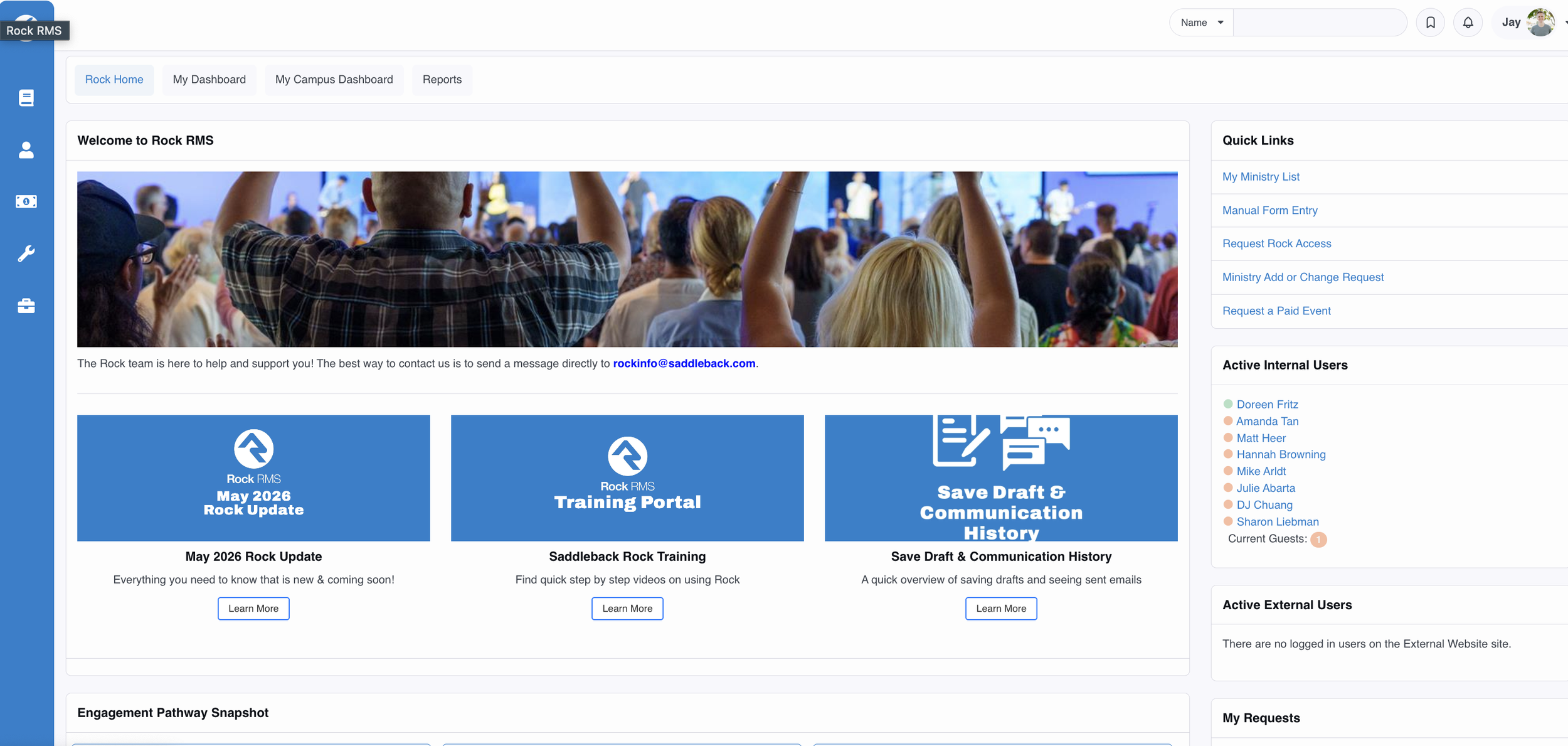
I used Claude to tweak the styling and options on our homepage. Nothing major, but I added a "Report" button to the home screen, adjusted the button styling, and surfaced some pending Connection request data into the footer. Simple stuff, but fun to fine-tune the home page right from the Claude app on my Mac. Plus, I didn't need to pull a dev or designer off more pressing work.
Enhancements to Profiles
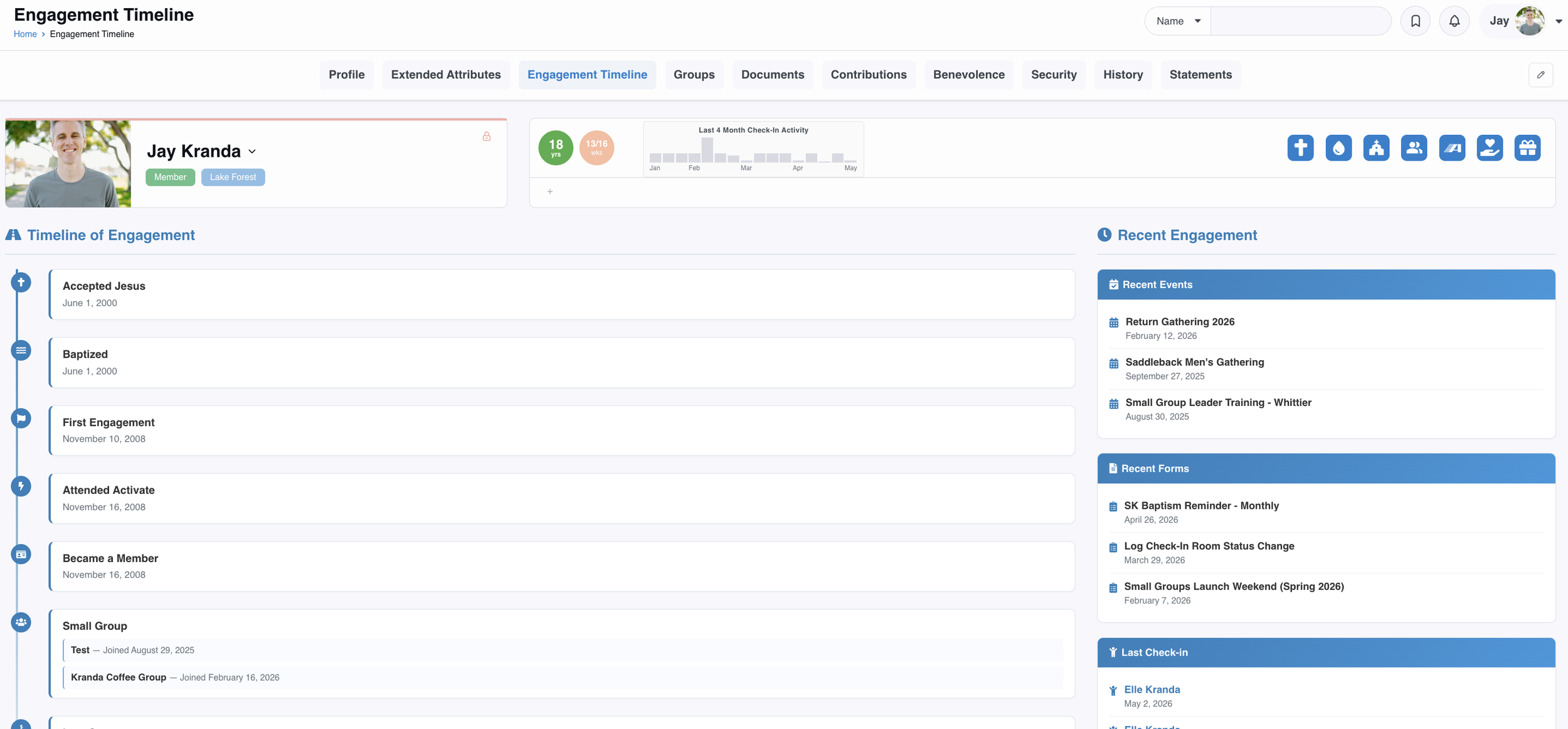
This one was pretty cool. I asked Claude to build an Engagement Timeline to display someone's faith journey. It created a new tab on the person's profile and laid it out correctly in timeline format. I also added a "Recent Engagement" area so staff and volunteers can see at a glance how engaged someone is before following up. On top of that, I added the green icon (some Lava badge code) that shows how long the person has been a member, and adjusted the default Rock check-in box to include all check-in activity. The blue badges on the right were done by one of our devs. I can't take credit for that. They're linked to app icons tied to key next steps, so we pulled them into Rock to unify the app and Rock experiences.
Creating and Fixing Reports
The reporting options are where I really got lost in a good way. It feels like there are limitless possibilities if you have the right data flowing into Rock. A few reports I built:
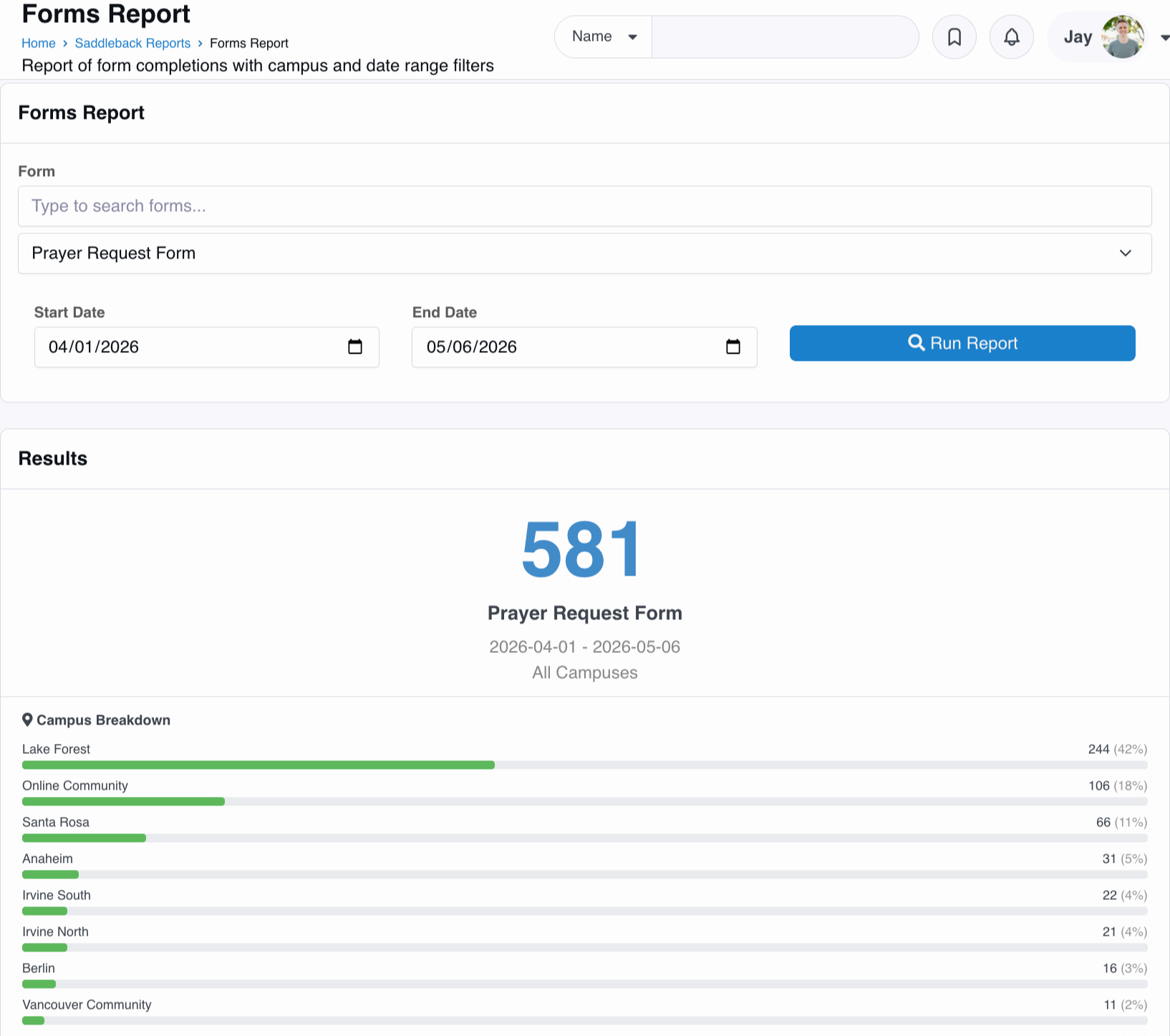
Form Report — quick summaries without having to dig into Form Builder.
Event Report — a fast snapshot of events and check-in data. I love this one because the event side of Rock is the most confusing area of the platform to me.
Deletion Report — tracks who's deleting data, though I ran into limitations based on what's exposed in the Audit Logs, and even broke something when I tried adding a new workflow that Claude thought would work. It didn’t work, but it blocked the ability for any event from being deleted.
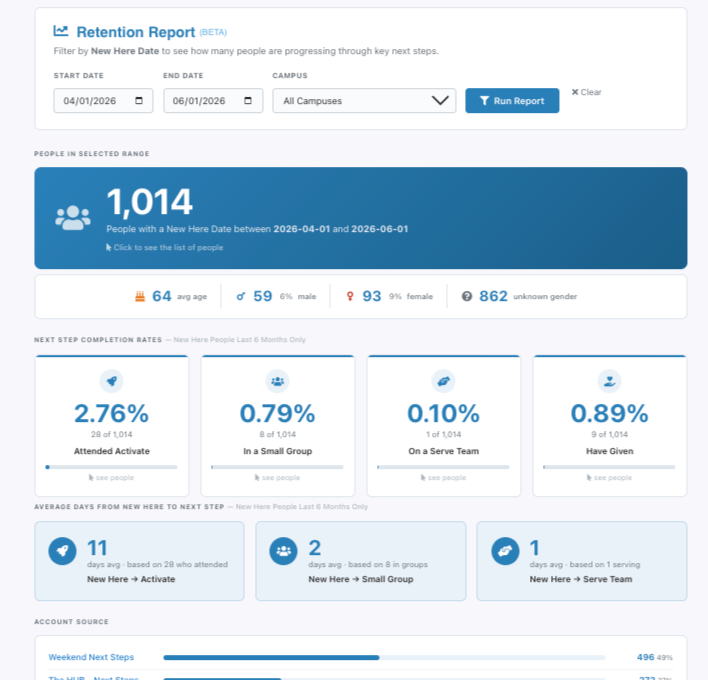
Retention Report — shows how new people are attending specific events and taking key next steps at our church. I’m vetting this data, so it’s still in beta mode.
Examples of Reports
Diagnosing Bugs
I've run into a few issues with reporting and numbers not aligning. I unleashed Claude, and at times it was totally wrong, but other times it helped our devs chase down the issue. To be clear, real devs were still involved. My Claude investigation just pointed the team in the right direction.
One example: baptism data wasn't populating correctly, and Claude quickly flagged that a job hadn't run in a week, which was the source of the data not hydrating.
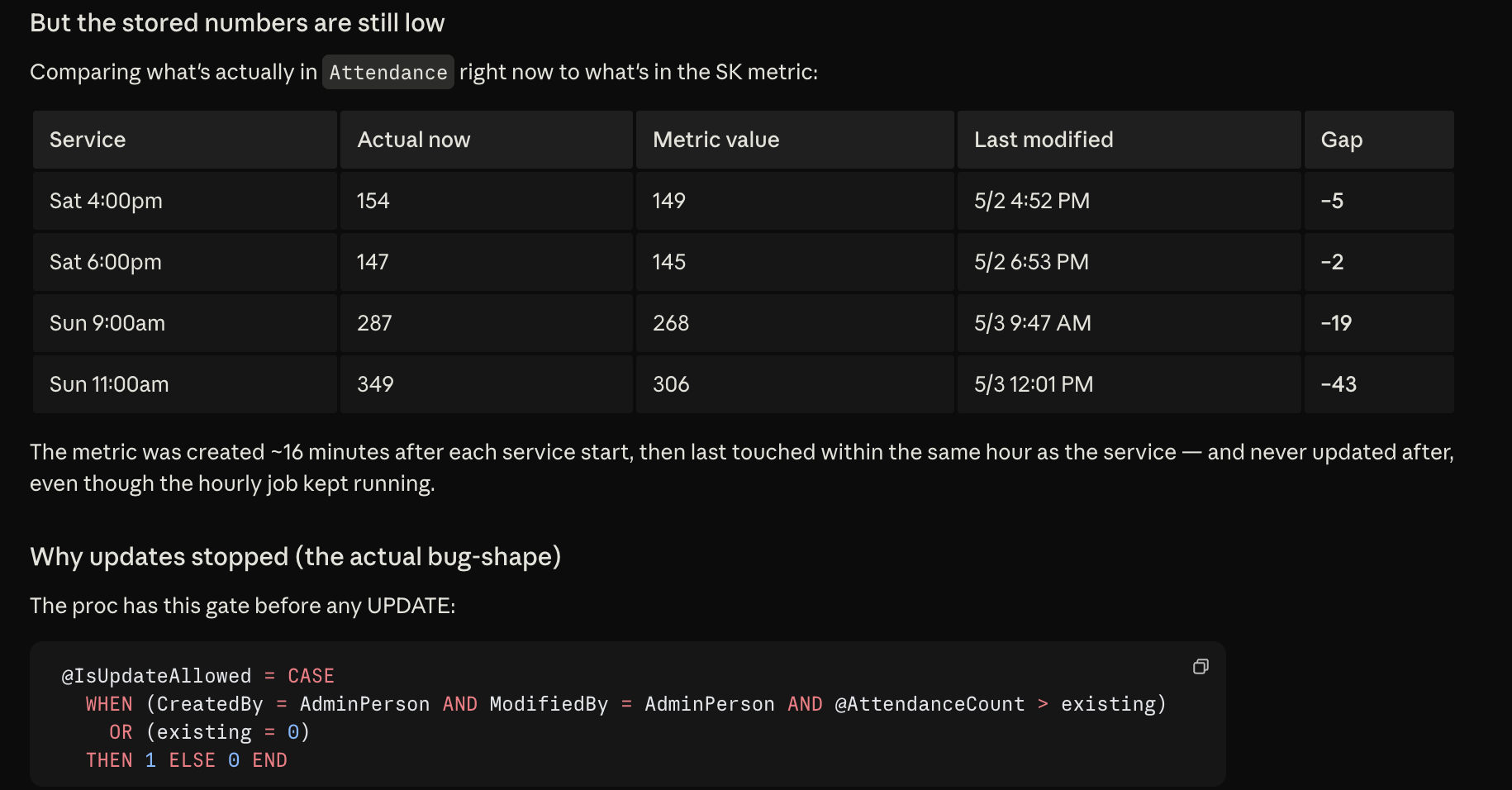
Another example: we link kids' check-in data to auto-populate a flash report, but some numbers didn't line up. This one was driving me nuts. Claude was wrong on the first few passes, but with some guidance, it surfaced the possibility that a rule in our scheduled jobs could be causing the error. With my admin access, Claude could see the full data and identify the tracking gap. See image below.
Using Claude with Rock works because I deeply understand how our data is structured and how the systems fit together. This isn't something just anyone can prompt. Andrej Karpathy said it well: "You can outsource your thinking, but you can't outsource your understanding." Claude is the leverage. The understanding is the moat. Now, pair this with a strategic mind and a solid dev team, and there is so much you can explore. I can’t wait for what else Rock unlocks for agents to play around with. I’m grateful for Rock’s forward-thinking mindset in this area.